Step 1) Understand the ecosystem – PART 1

Regardless of the steps involved in creating the paper prototypes, an important point to understand is that one has to think visually. We are taught to think in a structured way, question and get answers in a logical way, conditioned to rationalize everything. That’s good. But you have to use imagination too – things that may defy the conventions and make you connect the dots. It’s okay if there are some things that remain unexplained, things that you cannot make connections with. Like all mysterious things, let the discovery awe you in the design process, while designing the product / service. You are not going to get all the answers at one go.

Whenever in doubt, bank upon your imagination and visualize those aspects that make things ‘believable’. When you understand the ecosystem, knowledge is as important as imagination.

Ecosystem could be a vast sea and probably you might be designing a very small yet significant part of it. E.g. In a financial institution like Citibank or HSBC, your design goal could be to optimize the online self-help documentation that will minimize the helpdesk telephone calls (eventually reducing the cost to the company). If you are new to finance domain, you are lucky. You could be in a position to imbibe the best knowledge of the finance world and design solution accordingly.

User experience designers often say that they design technology-agnostic and domain-agnostic solutions, i.e. whether is a life science project or a telecom project or any educational project, their design process & deliverables will remain the same. Regardless of the organization & the market segment, they work ‘horizontally’. However, there is no harm in being a little vertical about the domain. Having deeper insights about technology, undefined rules, sensing the interplay between different stakeholders will always help you.  We call this horizontal and vertical approach as the “T” approach – the alphabet signifying the horizontal direction designer undertakes project-wise (across all departments of the organization) and the vertical direction signifies the direction designer seeks domain-wise (deep probing a specific area). Team up with a systems engineer, a marketing expert, or corporate communications or public relations manager and get those great insights.

This T-approach will help you understand the ecosystem. Understanding is not just asking questions to stakeholders and users. Nor it is just about doing contextual inquiries of the users. It is also about sensing things. It is not reading and deducing the written material. It is also about ‘reading between the lines’. A designer already has the gift to imbibe things, a keen eye and attentive ear, an imaginative mind and visual thinking. To understand the ecosystem is to commission all the senses and orchestrate the data, information and the insights that one gathers from all the customer touch-points.

Remember Sherlock Holmes? Have you read ‘Tinker Tailor Soldier Spy’? Have you seen the Jason Bourne trilogy of movies? Its all the detective and spy stuff, which might excite one – all the protagonists of these fictions think and act differently. Their ‘view’ of the problem at hand and the ecosystem is what makes them successful.

So what is actually an ecosystem? It is the designer’s view of how he/she looks at the things that influence the design. This will tell the designer how certain things work. Who makes them work? What happens if a certain parameter is missed out? What will happen if the output is overshot? Will users abandon the ship if a certain task is vaguely defined?

There are many questions that one comes across in designer’s mind. As discussed earlier, there might be answers to few. For unanswered questions, it’s good to use your imagination. Some questions might be answered during the later stages of design (prototype iterations or user testing).

As a designer, you either facilitate or make a disruptive change to the system with your designs. Most designers take the pleasure in breaking the system by being in the system. That’s what ‘T-approach’ is all about.

In the next post, let’s look at some examples of mind-maps that define the ecosystem.

The anatomy of paper prototyping

Over the years, I have witnessed the change in how I approach any design problem. And create design explorations for the problem.

The change could be credited to factors like new tools being available, understanding the deeper sense of design, adding more granularity to the design deliverables, interconnecting the relationships between different variables, etc. This is an ongoing process and the learning never stops :).

There are different ways to start off and design for any context. End to end user experience design lifecycle is expressed in different forms by different design agencies – the sub processes change a bit, but the essence remains the same. On a high level, any user experience design project will fall into four distinct buckets – (a) requirements understanding (b) conceptualization (c) prototyping (d) implementation / deliver.

Paper prototyping falls into activity (c). Some might be inclined to slot into (b) as well, its acceptable. May be it falls in both areas. Purists will never stop arguing, pragmatists will get the paper, sketch it out and pitch the design :).

I have used paper prototyping technique most of the times in presales process. It helped me a lot. While I do this step in the detailed design activity (low and high fidelity prototyping), it’s the pre-sales paper prototypes that have garnered the customer ‘wow’. Once you go past that stage and enter the delivery cycle, wow is replaced by ‘now’ (“I want this to be designed now”). Nevertheless, paper prototypes will never let you down.

So how does one go about designing the paper prototypes?

Here’s a 4-step approach.

Step 1) Understand the ecosystem
Get answers to these questions – Who is the real user of the product / service? What are the dependencies? What is the overall goal? What are the controllable and uncontrollable variables involved? Who are the stakeholders? What are the different business processes?

Once you get the answers, be as visual as you can. Create mind-maps, information graphics or any other graphical form that expresses “the big picture”. Yes, the big picture.

Step 2) Create the information architecture
Understand the different “information buckets”, the hierarchy of information and create information architecture. Some might be comfortable to see and depict the relationships among data, which serves well too.

Information architecture will help you understand the length and depth of the information the product / service holds. Having information architecture ready is like having a blueprint ready of your product.

Step 3) Create the user task matrix
Write down these questions – How many times a user is going to perform a specific task? What is the input user needs to perform this task? Will the product / service break down if the user does not do the task? What are the dependencies of this task with other tasks?

Some designers might consider skipping this step and creating “task flow” – its perfectly fine. The idea is to understand the nuances of user tasks – who does it, when and how.

Step 4) Understand the target device considerations
Is it an iPhone app? Or an enterprise dashboard seen on a tablet? A good-old fashioned desktop application used by legacy users whose keyboards squeak every time they press any key?

Of course, connect this point with real-life usage context too. E.g. this is a point-of-sales application to be used by a sales agent in a crowded grocery store on a monitor with screen resolution 640×480.

You are welcome to add your steps in between or skip some of these steps. Whatever works for you, works better. These 4 steps have worked for me, so far. And as I said earlier, I may refine these steps as I learn new things down the line.

We will expand these 4 steps in coming posts.

Examples of paper prototypes

Before we get down to the actual process of creating paper prototypes for the digital products, I would like to share some samples. These samples gives the spectrum of the different domains that we can apply paper prototypes to. As a matter of fact, paper prototype is one of the de facto steps of user experience design process.

Here are some sketches I did for different design problems:

Example #1

Cricket based iPad application

Cricket based iPad application

Example #2

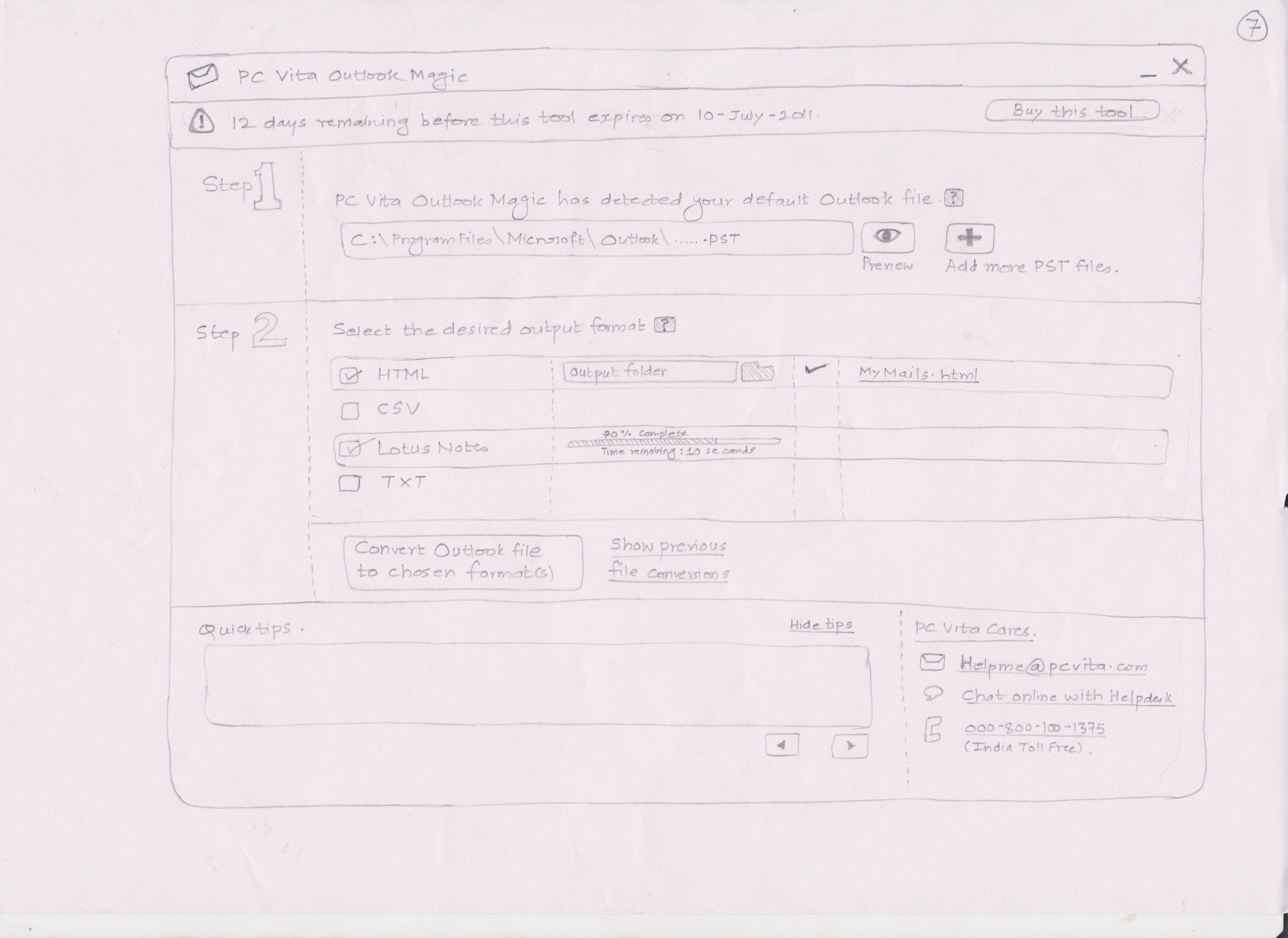
File format convertor desktop application

File format convertor desktop application

Example #3

Enterprise portal for interaction design pattern library.

Enterprise portal for interaction design pattern library

Example #4

Enterprise portal application for payment cards industry

Enterprise portal application for payment cards industry

Example#5

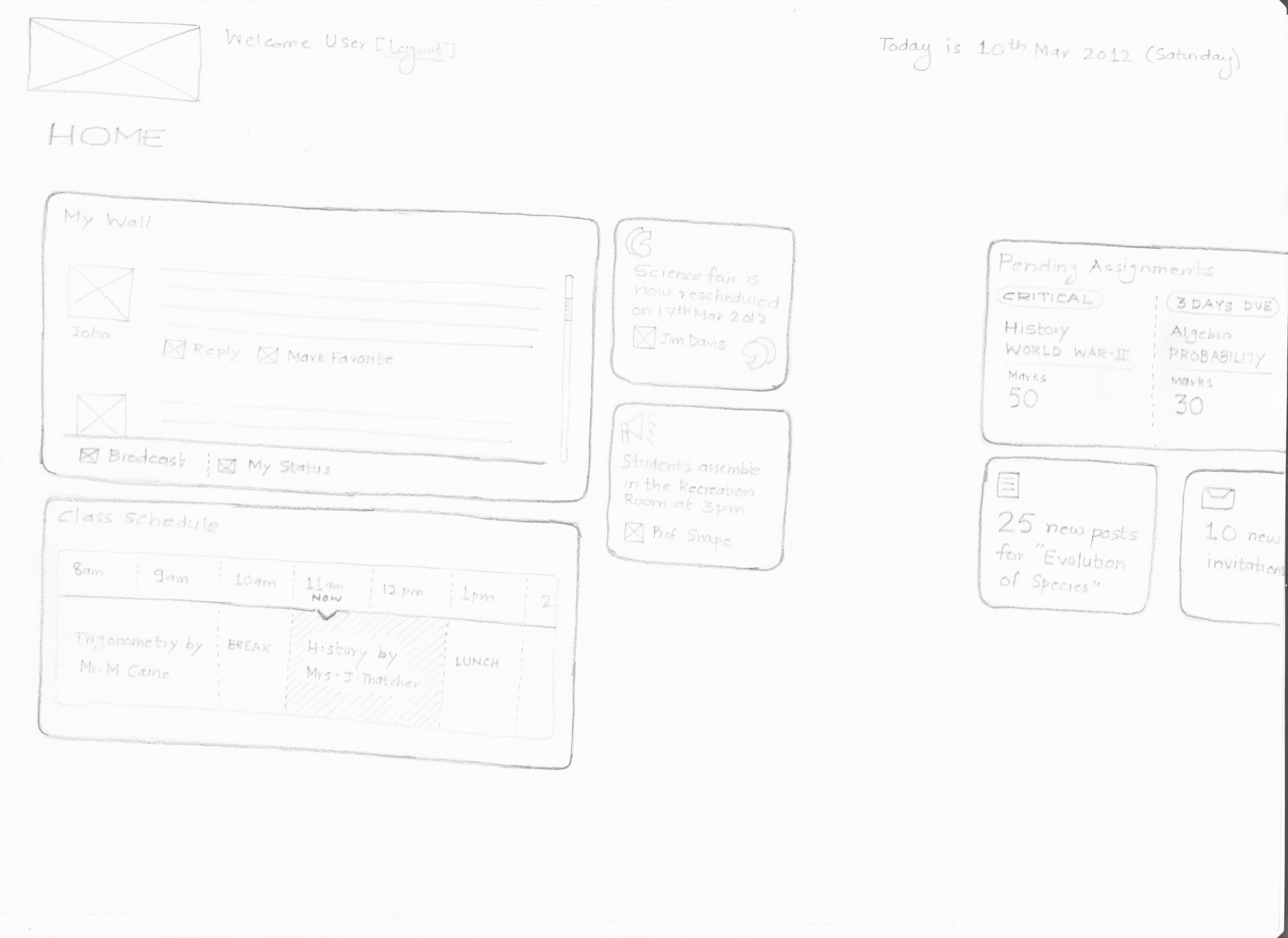
Windows tablet application for educational repository

Windows tablet application for educational repository

Check out the way these prototypes are done – the elements that make up these prototypes. What is the starting point? How to visualize the flow? What things need to be taken care of before building the prototype? What is in scope / out of scope?

Let’s discuss this in our next post.

Before you start…..

Paper prototype does have its advantages over other visualization techniques. It is a carefully crafted activity that transforms all the “blah blah blah” into concrete form.

I have been the proponent of paper prototyping for many years. Though this design tool helps you to design technology-agnostic solutions (enterprise portals, dashboard, mobile apps, interactive television program, etc.) there are some aspects of this process which you want to consider before you start sketching.

1) A mature customer
User experience activities are generally driven by user experience practice managers or product managers or the CxOs of the organization who really care about product they want to design for mass consumption. A mature customer is the one who will encourage to go deeper down the fundamentals of requirements (talk about user psyche and cultural memetics), sit down with the designers in brainstorming activities (.e.g. card sorting, quick and dirty concepts, etc.) and help UE designers understand the big picture (ecosystem, processes, inputs and outputs). Its fair to assume that in practical scenarios all these tasks are divided between different team members and you rarely come across a customer who will provide you inputs at one go. The bottom-line – revealing key information to UE designers is a must. Some nuances of user information directly determine what you are going to put on the paper.

2) Technology is a magic box
We are familiar with all types of UI patterns around us. The ubiquitous widgets, controls, patterns have made us wiser in picking and applying those UI patterns in familiar situations. E.g. we will not choose art cover pattern for address book. Sometimes it does help to take out these patterns from your library, print them and take them with you.

Even its good to have data visualizations with you. iOS, Android, Windows mobile and other OS-specific UI controls will be handy too. The idea is that you can create a fusion of available patterns that justifies the user journeys. If you are that brilliant, you can even invent one :).

When you put down these patterns on a paper you are creating a technology-agnostic solution. You don’t care about whether its going to work or not (that will be done after you put things on paper, by the development team). For you, technology is a magic box. And you are the magician.

3) Time keeping & granularity
Regardless of the software development life cycles that you are participating in, paper prototypes are designed in a very fast and effective manner.
It may be good to go with a team size of at least 2 UE designers who can divide the user journey amongst themselves. What level of details you incorporate in your paper prototypes will directly determine the overall timeline of your work.

While designing the paper prototypes, keep in mind the verbiage/content/user vocabulary. Its better to draw granular details on paper – it removes abstraction, helps in exploring design options (if you want to chose from UI patterns) and makes the design believable. You are the best judge of what will go on to the paper. Aid paper prototypes with your comments, Post-it notes, etc.

It is possible to compact the paper prototyping activity in 3/4 days or a week. It depends upon how much time your customer is willing to put in this activity. For all the ideas that are emerged in these days, take a judicious call about what you want to sketch.

4) Tools of the trade
Papers, pencils (0.7mm is my preferred choice), color pencils/pens, highlighters, markers, Post-it notes, scales, cutters/scissors (to cut papers), push-pins, soft-boards (to put your paper prototypes for discussions), cello tapes, double-sided tapes, camera (to capture white boarding activities) and a scanner (for scanning the paper prototypes).

5) Beyond paper prototyping
Paper prototypes are generally throw-away prototypes. Meaning, that these prototypes will get mature over discussions and time. One should not get too much attached with these paper prototypes. Their existence and usage is limited. One has to churn many iterations of the same prototype over weeks before latching on to a concrete idea.

Involve development team from the start – they also have a say in what we design. But don’t kill your ideas on paper. Paper prototypes that survive and mature over the time are finally taken to the wireframing stage – you digitize everything that has been recorded on paper. One of the pitfalls of paper prototyping is that it does not have interactivity. Wireframe design is the next logical step once you are done with paper prototypes.

It all starts on paper…..

During my design school days (8 yrs ago) when I was working on interaction design projects, paper prototyping helped me a lot in giving the concrete shapes to my abstract ideas. Paper prototyping cleared a lot of ambiguity. I was able to demonstrate how the digital product would look like and how it will behave.

Since then, I have been an ardent follower and practitioner of paper prototyping. I have seen that some interaction designers have an inclination to skip this step and jump directly to tools like Axure, iRise, Visio, etc. The interaction design students too have tendency to disregard the power of paper prototyping and the possibilities that it opens up.

Paper prototype helps you to give concrete form to the user task flows. It is a starting point of everything related to your digital product design. A social app, an iPad app, a desktop widget, enterprise applications or dashboard – everything can be designed on paper.

I was designing an astrology portal four years ago. The product manager did not have any clue of what design process I followed. I did exhaustive sessions with his development team to arrive at the information architecture. When the first sketches (paper prototypes) of the portal started to emerge, the manager got curious. Subsequent discussions on the paper prototype ensured that all the “requirements” had been addressed and we finalized the user journeys. Only after that visual design mockups were produced. The development team harnessed the utility of paper prototypes and saved a lot of development cost, in this process.

Known web entities too champion for the need of prototyping (some root for paper prototyping & some for iterative prototyping). 37signals recommends to prototype fast and often. I have worked as a consultant to eBay and eBay gives thumbs up for paper prototyping. So does AT&T.

Whenever in doubt, go back to paper. It will help you a lot. Just take out the paper and pencil, sketch it out. If you are convinced, you will convince others about the next ground breaking product. And paper prototype will help you to just do that.